
Travelling at Night Pre-Release: support & bug reports
THE EASIEST WAY TO SEND US BUG REPORTS IS IN-GAME WITH F10 / BUG REPORT ON THE MENU. THIS INCLUDES ALL YOUR LOGS!
But if you prefer email, then you can reach us at support@weatherfactory.biz. We read everything we’re sent.
If you’re reporting a bug via email, please let us know
(a) a description of what happened, what you’d just done in the game (and what you thought would happen instead if that’s not obvious)
(b) a screenshot if possible – worth a thousand words (an exchange rate artists have used to mock writers for generations)
(c) Your save file and your player.log – information on where to find these is below. These are often vital!
+ Important: the game creates a new player.log each time you run it. So if you have a crash and then run the game again, your clean log will overwrite the old log, and vital information is lost to time. Send us your hot, fresh logs. Unity keeps exactly one old log as player-prev.log.
+The log file also tells us your current game version and OS – so if you can’t send us the logs, please let us know that info.
Thank you!
Sharing / streaming the game
You’re welcome to share images and video of demo or pre-release versions, as long as you make clear it’s unfinished and include a suitable watermark somewhere clearly visible on your media. If you don’t have one of your own, here’s one you can use.
Please don’t extract and share content from game files, whether text, JSON or binaries.
How to find your save file and player log on WINDOWS
All Travelling at Night game files are found here:
C:\Users\[YOUR USER NAME]\AppData\LocalLow\Weather Factory\Travelling
Replace [YOUR USER NAME] with your actual computer’s username, e.g.
C:\Users\Alexis\AppData\LocalLow\Weather Factory\Travelling
The folders are hidden by default, so you may need to change to Show Hidden Files in the Explorer view settings – or just paste the path into the Explorer location bar.
The save file you are looking for will be called save_[number].dat, e.g. save_0.dat, save_1.dat.
The files called saveinfo.dat and saveSlotMetadata.json are just used by the game to manage the files – they don’t contain any useful information for us.
If you’re not sure which to send, just send the whole lot 🙂
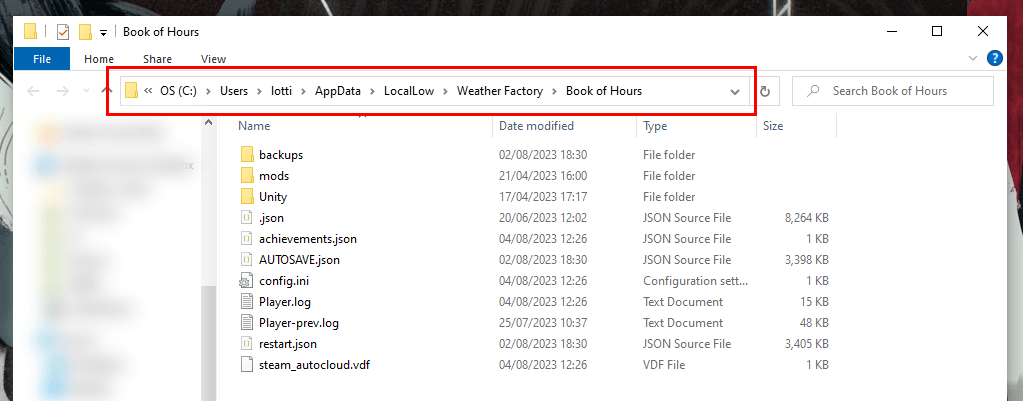
How to find your save file and player log on a MAC
On a Mac, logs and save files are in different places from each other!
Player logs are found here:
~/Library/Logs/Weather Factory/Travelling
And save files (plus config.ini) are here:
~/Library/Application Support/Weather Factory/Travelling
The save file you are looking for will be called save_[number].dat, e.g. save_0.dat, save_1.dat.
The files called saveinfo.dat and saveSlotMetadata.json are just used by the game to manage the files – they don’t contain any useful information for us.
If you’re not sure which to send, just send the whole lot 🙂
How to find your save file and player log on LINUX
Harder to choose a representative screenshot on Linux! but you should find the files here:
~/.config/unity3d/Weather Factory/Travelling at Night
The save file you are looking for will be called save_[number].dat, e.g. save_0.dat, save_1.dat.
The files called saveinfo.dat and saveSlotMetadata.json are just used by the game to manage the files – they don’t contain any useful information for us.
If you’re not sure which to send, just send the whole lot 🙂
How to find your version number (any OS)
Boot up Travelling at Night nd look in the bottom left hand corner of the main menu screen. The version number is displayed there.
Thank you!


So wait… There is only the option to play as Spencer?
I was looking forward to this game but I spent way too long roleplaying a man in real life.
LITERALLY the same issue lmao. The game seems interesting but I have NO interest in playing Spencer.
The writing is good as usual. I like the dialogue-driven narrative so far. Grabbed me much more than Book of Hours, which I’ll try to reapproach at some point (no promises)
First, I should agree on the great writing – and tutorial advices are top-notch 🤌 And thank you so much for proceeding releasing your games for Mac! The one suggestion for MacOS is to change middle mouse button for something else since most Macs just don’t have one.
Okay, where’s feedback form though? You had one for Book of Hours and it was handy.
I love it. But could you add otion to show text quicker and maybe lower amounts of clicks needed? Like to show another part in multipeople dialog? or after leave option I stilll need to click on continue?
Wishlisting and looking forward to full version
Also say hi to worms 🙂
I concur. The text is painfully slow, and having to click constantly is a bit annoying. Letting us set the faster speed as default would be appreciated.
Some feedback: sooo much clicking for walking and in conversations
Gorgeous and lovely demo from a gorgeous and lovely team.
There is some weird choppiness with the pathfinding, sometimes Spencer turned the opposite direction and walked backwards to a place. I didn’t get stuck ever, so it was only a visual issue.
One little thing, I noticed if you talk to Mathis in passing you cannot end the dialogue without starting one of the branches. Maybe add an option to nod in passing?
On my first pass, I hadn’t completely grasped the footnotes, but now I’m fully addicted to clicking through everything and reading it all in one go.
Only friction for me so far is the clicking and hovering to see all of the popup boxes, especially over skills and passions and such. Sometimes it doesn’t pull up the box, and I have to mouse off then back onto the element to display the box. Also, clicking a footnote when no box is displayed doesn’t focus that note, you have to do the off-on maneuver to display the box and then click.
I love it, thanks for the hard work and please keep it up!
I quite enjoyed the demo, however I had a couple issues. It wasn’t clearly communicated to me what the choosing options on some notes meant, and clicking middle click did nothing, though it’s possible that’s my computer’s problem. I think it would be better if part of the intro explicitly talked about making those note choices, and also that “T” was listed as well as middle click for them. I also wish it was noted that one could zoom in/out since I spent the first section of the demo stuck all the way zoomed in.
I also think it would be nice if after a interaction that pulled your camera in, it then returned your camera to the zoom it was at. I also had some trouble with crafting at stations, when I’d go to check my inventory I would then have left the crafting station and have to exit out of the inventory and information screens, which was time consuming/annoying. I wish you would remain able to use the station as long as you didn’t exit out to the overworld.
Very enjoyable experience so far, love the lore and the music and overall atmosphere.
The crafting screen is a bit of a struggle for me at the moment. I’m at a Hearth venue, it would be useful if it highlighted which skills match the Hearth. When I mouse hover on a skill, it adds highlights to matching venues, but Hearth stays highlighted in the same way regardless, so its not easy to tell if “this skill matches Hearth” or “this venue is already highlighted because you’re at a Hearth”.
When I go to add an item to a crafting recipe, it doesn’t tell me how many of that item I have. Could be added as a number in the bottom right corner like in the inventory screen. The X and then the icons aren’t immediately obvious as “you’re not in the right venue, silly” Maybe have “Venue” beside the X?
Having your current skill beside the required skill for the recipes would be nice too, so I can see how far off I am from being able to craft something. Overall goal is to reduce the need to visit other screens to check information.
I have been a big fan of Weather Factory and also been looking forward to this new game. So far the game runs well on my end, and, as always, it didn’t fail my (high) expectation and love!
Only one thing I would love to add on: As a “senior” game-player, the size of the font sometimes troubled me (especially the ones of hints/ guides at the beginning)… I wondered if there could be opinions to enlarge the font size? (but also I understand this may ruin the game art design as well as cause much more effort).
Regardless, I really enjoyed the game (which, like the previous one, has overwhelming texts and informations). Thanks for insisting on developing this kind of game!
It was good, i’d be happy to do more beta testing or proof reading if need be. I’ll address that Spencer’s portrait and his in game model are not the same colour, but i suspect you know that already.
My main bit of feedback would be to maybe add visual effects to the world as troubles mount. De-saturate colour as dread builds, increase gamma or bloom as fascination or weariness builds, or add a barely notable ticking or heartbeat sound to the background as Trace increases. I’ve played the demo through about 10 times and there were quite a few where i suddenly went crazy, so more visual feedback would help with immersion and remind players to take better care of our boi.
Absolutely phenomenal. I will certainly buy it. I just finished the demo and was sad to let the story go for now. Alexis and Lottie are making interesting and fun games in a world that is rife with intrigue. It’s one of the few games that feel like the choices I make aren’t necessarily punished but shape the world in a meaningful way around me. The writing is strong, perhaps the most quality story telling in modern video games form. Read Alexis’s book on world building, listen to skeleton songs. and continue to do favors for yourself in pondering their creation. I appreciate the departure from triple A titles for what Traveling at Night offers as a meaningful and thoughtful expression. Thank you for sharing your creativity with us. It is much appreciated.
The demo certainly delivered… It left me yearning for the rest of the story. I could sing praises all day, though I’d like to offer a few points of constructive criticism instead, assuming this is the right place to leave feedback.
1. As others have commented, clicking through dialog tends to get old very quickly. It’d be good if the text advances at a reasonable pace w/o requiring user interaction (could be determined by a setting) until the dialog reaches a decision node.
2. My view on crafting is biased because it’s seldom my cup of tea as a gameplay element. However, imho the crafting system appears “tacked on” in that I’ve not utilized it by the time the demo concluded. Perhaps I’ve failed to see the brilliance of crafting here, but if it’s intended to a core game mechanic, then I hope that the final implementation is more seamlessly integrated into the gameplay loop and more engaging than navigating through a prosaic UI. (Don’t get me wrong — the artwork looks wonderful. It’s just that constructing a recipe seems to involve a lot of mouse clicks, on top of gathering the ingredients.) I think Cultist Simulator takes a more elegant approach to crafting that even a more complex title like this game could draw ideas from.
3. A few dialog choices can lock the player out of the “normal” dialog tree with certain NPCs. While branching consequences are par for the course in an rpg, I suggest avoiding choices that limit player agency unless there are clear narrative-driven reasons. To avoid spoilers, I’ll just say that I feel a bit cheated when I’m unable to interact normally with certain NPCs after simply offering to “complete their quest” — generally not enough to save-scum, but enough to lose interest in them.
With that said, I appreciate all the attention to detail that has gone into the making of this game thus far, and I look forward to its full release.
-Tom
P.S. I found the “No other option” travel option hilarious. Very nice touch.
The game is very promising, but there’s a fine line between being mysterious and obscure and you have crossed that line by a mile. Here’s Horomachistry’s explanation, the piece of text with the main purpose of adding clarity:
Horomachistry – The laws and contentions of the Hours and their emanations. Covers Church doctrine and to some extent technique, although technique is more usually Illumination. Like Illumination, it’s a Bright Art. Used at Thresholds and in Holy Places.
Failing Horomachistry checks will add Fascination.
This left me with more questions than answers. What are the emanations of Hours? What’s Illumination? What’s a Bright Art? What’s a Threshold? What’s Fascination?
Maybe I’m just a dumb foreigner who is too stupid for this game, but I won’t be the only one. Being bombarded with so many unknown terms before playing the game for a single second will be too daunting for a majority of players. For comparison I never had similar issues with Disco Elysium or House of Leaves. I’d highly recommend adding clearer gameplay explanation of the game mechanics in addition to the admittedly very cool lore parts.
I previously made the Choice that Sylvian would be my “true” name. Would be nice for it to somehow be reflected, because my character still asked Vincent to refer to him as Spencer.
This demo was spectacular – I have played it through three times now, with different choices, and I can’t wait for the full game! I was really curious how you would handle a game that has to visualize the supernatural elements of your Secret Histories, when your previous work did such a great job with really evocative, haunting descriptions. But there really was no need to worry – the result is fantastic, and writing is as beautiful as ever. I particularly like your footnote system – I am the kind of person that likes reading Wikis, and clicking through nested, discovered trivia cards with interspersed choices (and getting rewarded with experiences) is an inspired gameplay idea! My only nitpick was the crafting system – it took me a while to figure out, and while creating new objects or getting rid of troubles are self-explanatory, I didn’t really see the point of crafting memories, yet. I presume they are useful to access aspects for which you have no influences, or “preserving” influences that might otherwise decay before travelling, but that might benefit from being made a bit clearer. But, as I said, just a nitpick – I am really looking forward to the full game!
I really enjoyed this demo and wanted more. Unfortunately, I have no bloody clue what happened. And I’m not sure I can be doing that for an entire game.
I kept feeling like I had missed something. A memo? A prequel? A vision or a memory from another timeline perhaps? Or simply the campaign setting/familiarity with the universe this is set in? To clarify, the plot is clear to me. But everything else, both macro and micro, is shrouded in more mystery than you perhaps intended. I don’t understand the lore and it’s not really explained. The resources are confusing, undefined, and I was predominantly unsure what to do with them. Why am I crafting memories? What for?
And while the explanations are quite entertaining to read, I mostly felt like I was reading beautiful gibberish. Step 1: read info. Step 2: nod sagely. Step 3: remain absolutely without a clue. Words are used as if they’re supposed to mean something to us mere mortals. But either they don’t mean anything (e.g. bosk) or they’re so general/generic/vague that it’s impossible for me to remember what the specific meaning in the game is supposed to be (e.g. rose) — that is if I was even able to figure out said meaning in the game.
How am I supposed to find the moral choices right for me, when I’m lacking knowledge of the history. Actually, that’s exactly it: I was feeling like I had missed was an entire multi-book history anthology of the in-game world. The ultimate nightmare feeling of “no one told me there was homework and now I have no idea what’s going on.”
Perhaps one needs to have played your previous game(s). And, like, fair enough. As long as you’re aware that this makes it incredibly hard for new folks to get aboard. For me, it’s a bit of a shame because I think I’d love this game if I understood what’s going on. I retain some hope that the full game will make this easier.
I agree, I am more familiar with the worldbuilding from their previous game so I had an easier time but the game might benefit from putting some plain explanation into the first tutorial chapter or weave it into the dialogue so some of the basics come up.
Interestingly enough, Disco Elysium also starts you with 0 knowledge of the world, but so does your character (and the world is much simpler to understand, besides the Pale reveal) in this your character is very aware of the Occult and treats it like that, which creates a rift between the player who might have no clue what those words mean, even with looking up the keywords, a basic primer aboult how Spencer thinks the Occult works would do a lot of groundwork.
I had a blast with the Demo, planned to play Spencer as a honorable Priest, the sysem of getting extra pips worked great for rewarding you for actually roleplaying and not falling into a power gamer mindset. I ended up with a lot of Compassion, Sorrow and interestingly enough Whimsy triggers too, so I am really looking forward to unlocking two of those when I get to further develop my version of Spencer.
The biggest issue I also had was the running time, the game areas are big and just wanting to check up something at the black market when you are allready waaay on the other side of town wastes a lot of time. A checkpoint/minimap fast travel system for a handful of the biggest points of interest would go a long way there.
Also this game does something great, in a way I havent ever seen bevore, namely conversations. The fact that you cant take back what you said, you cant just pick trough all the dialoque options to collect all the information, you really have to think about your replires and sometimes how to butter someone up well.
The running animation still seems very wonky, especially the skirt of the jacket moves way to agressively.
Thats all that I remember so far and while it has some quality of life troubles, the writing and core concepts are on point and translate what I loved from Cultist Sim and Book of Hours really well into a CRPG.
I’ve played through the demo twice with different backstories/passions etc. and I can’t wait to see if the full game will have the same replay value. I think there’s some room for a little QoL with the skill checks though. I noticed each skill seems to have 3 corresponding aspects to save a failed roll with, and I think It’d help a lot with risk assessment if those were displayed alongside the skill in the dialogue options and not just in the character menu. Alternatively, being able to open the menus (character menu especially) would help just as well. No notes on the narrative though. 10/10.
Love the game, I wish I could customize Spencer’s look at least. Not liking Spencer. Can’t wait to play more. 🙂
I am very intrigued and hungry for more!
Overall, a delightful demo. I really enjoyed my time with it, scratching the esoteric ‘play to understand’ and making unexpected connections that I loved about Cultist Simulator and Book of Hours. I also adore the art style, the writing, the references!
It *was* a little fiddly at times. Especially the movement – sometimes a little tedious and slow, sometimes Spencer would get caught on something, occasionally it was very difficult to ‘interact’ with an object by approaching from direction (perhaps some larger objects should have a couple of interaction points?). And once or twice the text would stutter and repeat (happened mostly in displaying changes in ‘approval ratings’ with multiple people, in the cafe group especially).
The story has me quite hooked! At first I was a little disjointed not to be able to create my own character, but I learned to like S.H, and am excited to see him shape and change into… whatever kind of protagonist I choose!
X.
Ok, just finished. Overall, excellent demo, made me want to keep going. No clear bugs found. Some minor pain points listed below:
Object descriptions feel a little slow to dismiss—over a second before the game lets me click them away? This got annoying one time when I tried to walk away from a description and it followed me like a feral cat, trailing at the edge of the screen.
Walking into the Chez Felix was a bit unintuitive—I thought it was bugged at first and wouldn’t let me in. Maybe it should auto-correct move commands to the nearest valid spot?
It feels mildly unintuitive to have to switch to the Finished tab to claim Experiences from a completed quest—especially when the ones with claimed rewards look as the same as the ones with unclaimed. The unclaimed ones should have, idk, maybe a little glow or something.
Anyways, those are my subjective takes, but I thought I’d list them in case others had similar feelings. Great work so far, and best of luck with the rest of the game!
I would like to start with that I love the game already, especially the graphics and I’m excited to see the universe in an rpg format, buuut I do have some notes. I agree with people here about the footnotes. I just click through them because I’m afraid some of them will disappear haphazardly pick an option matching an aspect I want without even reading the notes (because some pop-ups containing footnotes disappear and I’m enough of a klutz to miss-click on them and make them disappear and then I have to reset the tutorial messages). And then I don’t go back to reading them because I forget and I end up missing a bunch of things. And when I actually remember to go back and read the ones I didn’t click might not be in the footnotes menu and I don’t remember the names of the ones I did click and there is no scroll through option. And now that I went back into the game I can’t find the footnotes I’ve already opened so now I can’t go back and read them either. Which I would love to because I do love the lore I’m just too scared I will miss things because they disappear and I have no way to check back on conversations I’ve had or tutorials that have popped up as far as I’m aware. It truly is a lot of clicking through a lot of things and with no way to go back and read what I talked about with people (again as far as I’m aware) I can’t just go back and click the footnotes I see later.
I wish I could craft more too. I love the idea of being able to craft things, and use those things in different ways but I think the system is pretty limiting. You need to have a certain skills to craft something, which makes sense but I would love if I could supplement my skills with memories or things like in Book of Hours. It would be fun to find a way to craft way more advanced things than I should mess with by collecting enough aspects. Or maybe crafting things to sell to make money.
I could also use some more interaction with the environment. Finding objects hidden in barrels, rooting around in the trash sitting on benches, having little knick-knacks that make the world feel alive. Possibly finding crafting ingredients, some normal others more occult (ants or pieces of a wall from a building with a scar on it, water from that one weird fountain, dust from the corner of a room, plant matter from other places.
Also switching on the quest menu from active and finished quests is like others said unintuitive for the layout you have. It could be another bracket next to the finished or maybe under it in a duller colour. I didn’t find the quest rewards on some playthroughs because of that.
Affecting the environment in more occult ways could be fun too. Maybe Spencer having been an exorcist (since you’ve wrote he has been all of those options) could mend some wounds or purify that one fountain. I can’t tell you how many times I’ve tried to interact with that one shadowy fountain to see if some item I can craft can clense it.
Also when the text is too long this text box I’m writing in bugs out and the lower parts, the e-mail and name just move lower and lower to the point I can’t click on it anymore because it disappears behind the bottom of the site behind the newsletter sign-up thing and that black background with clickable text.
All right, I’m continuing, sorry for the wall of text I’m just very excited about the game. That said this is just my subjective opinion as a player. As far as the crafting goes I honestly would also love to discover recipes. Like having a couple slots you can put whatever into including items and such, reaching a certain number of aspects and seeing what happens. That truly is and has been my favourite part of all your games. Now all the things you can craft or do are all laid out for you in the crafting menu and that’s nice in a way, I don’t have to troll the wiki if I get really stuck, but it does take away from the sense of triumph and discovery I enjoyed in your previous games.
Also sorry for the occasional wrong use of a word English isn’t my native language and I’m prone to typos.
I just played through the Demo, and I find myself feeling so intrigued and wanting MORE. Having played Cultist Simulator before, I love the Secret Histories universe, I've also just watched a bunch of videos on the lore. The world you have created is amazing and shrouded in mystery. I cannot wait for the full game! You're doing a great job thus far, and the writing is impeccable.
When will we get language localizations? would be interesting since we're traveling through Europe. I imagine spencer is navigating through with the languages he knows, English, French, etc.
immersive, literate, uncanny . . .